
Sticky Key problem between Windows Server 2012 and LogMeIn

This week I instructed my first class using Windows Server 2012 accessed via LogMeIn and discovered a Sticky Key problem every time you press the Shift key.
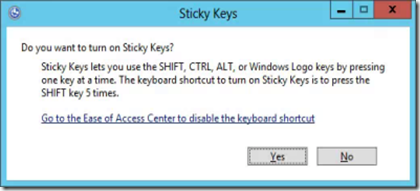
image
Here is my solution to resolve this.  First off, in the Preferences of LogMeIn for the connection to the Windows Server, click General.
Change the Keyboard and mouse priority to Host side user and click Apply at the bottom.
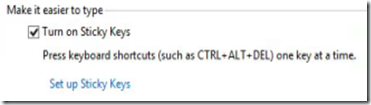
On the Windows 2012 server, open the Control Panel – Ease of Access – Change how your keyboard works.
Uncheck Turn on Sticky Keys.
image
Click Set up Sticky Keys.
Uncheck Turn on Sticky Keys when SHIFT is pressed five times.

image
Click OK twice.

If you are using Windows Server 2012 as a Hyper-V host, you will need to redo the Easy of Use settings on each guest operating system in order to avoid the Sticky Key Problem.

Updated Information: March 20, 2013

If you continue to have problems, Uncheck Turn on Filter Keys.


Comments

mantis2k said…
I have reproduced the same issue...hoping there will be a fix soon from logmein.
Anonymous said…
thank you, this was driving me mad setting up a Hyper_V host and guests over LogMeIn tonight (of course all my passwords also have lots of shifted characters...)
Ronnie,

I added one more step to the end of the post that may help.

Jason
Anonymous said…
I have just resorted to using the on screen keyboard for when I need to press shift more than once. Once the next OS based on Windows 8 that everyone loves they will fix it. :rolleyes:
Anonymous said…
Thank you very much. This was driving me crazy. To the other comments, make sure you do this on the host machine and all VM's.
Unknown said…
I have a Hyper-V host with 2 2012 Server VM's running on it. On all 3 the Host setting for Logmein is checked and on all three Sticky Keys are turned off and Turn on Filter Keys is unchecked, and yet it still keeps asking to turn on sticky keys after every keystroke that has a Shift in it for a capital letter.

Popular posts from this blog

With the AD Recycle Bin Turned on, What Happens when you Create a User Account with a Password that does not meet the Password Policy?

This was an interesting observation from one of my Windows Server 2012 classes.  While working with the AD Recycle bin in a lab, one of my students discovered some interesting accounts that were created. When he created user accounts that did not meet password complexity requirements, an account is temporarily made and then deleted.  When a new password is provided that meets the password requirements, then a new account is made. We discovered this in two places.  First off in the Active Directory Administrative Center.  This is what caused the initial confusion.  Take a look.  This is in the Deleted Objects OU. You can see multiple deleted accounts for Test2 and one for Test3.  Test3 is a valid, functioning user account.  Using the PowerShell command Get-ADObject –IncludeDeletedObjects –Filter * –Properties ObjectSID we can see that indeed, two accounts were created, with one of them deleted. Notice the RID portion of the SID is different. ...

Backup and Restore AD LDS with DSDBUTIL.exe

Active Directory Lightweight Directory Services allow you to create a directory service that allows applications to have access to user accounts, groups, and authentication similar to Active Directory Domain Services.  The big advantage here is that the schema of the directory service will not be bound by the rules of an Active Directory database.  Exchange 2007/2010, for example, use an instance of AD LDS on the Edge Transport Server to provide for user authentication from the internet.  Because your Active Directory database is not exposed to the internet, this is more secure. Applications will handle most of the dirty work should they require AD LDS.  You may want to make sure the database is being backed up and also have a restore plan in place.  Should the database become corrupt, the application that uses that database will fail.  This document will walk you through backing up and restoring an instance of AD LDS using the dsdbutil.exe command. Fi...