You may not have an error at all. Take a look at the drive mapping below.
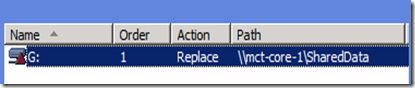
The red triangle is what threw us off. It is not an error. It is simply a color representation of the Replace option of the Action field in the properties of the drive mappings.
Create action
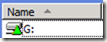
This give you a green triangle. The Create action creates a new mapped drive for users.
Replace Action

The Replace action gives you a red triangle. This action will delete and recreate mapped drives for users. The net result of the Replace action is to overwrite all existing settings associated with the mapped drive. If the drive mapping does not exist, then the Replace action creates a new drive mapping.
Update Action

The Update action will have a yellow triangle. Update will modify settings of an existing mapped drive for users. This action differs from Replace in that it only updates settings defined within the preference item. All other settings remain as configured on the mapped drive. If the drive mapping does not exist, then the Update action creates a new drive mapping.
Delete Action

The Delete action will give you a red ‘X’. This will remove a drive mapping.

The red triangle is what threw us off. It is not an error. It is simply a color representation of the Replace option of the Action field in the properties of the drive mappings.
Create action

This give you a green triangle. The Create action creates a new mapped drive for users.
Replace Action

The Replace action gives you a red triangle. This action will delete and recreate mapped drives for users. The net result of the Replace action is to overwrite all existing settings associated with the mapped drive. If the drive mapping does not exist, then the Replace action creates a new drive mapping.
Update Action

The Update action will have a yellow triangle. Update will modify settings of an existing mapped drive for users. This action differs from Replace in that it only updates settings defined within the preference item. All other settings remain as configured on the mapped drive. If the drive mapping does not exist, then the Update action creates a new drive mapping.
Delete Action

The Delete action will give you a red ‘X’. This will remove a drive mapping.
Comments