It never fails. Once ever couple of months I have a delegate in my class that has to keep a Windows NT4 box running. There is nothing wrong with that. Many applications build on Windows NT4 are solid. Why upgrade and incur cost when no upgrade is really required? That is generally the reason why Windows NT4 is being used. Another reason is the vender went out of business, but the application that is required is really good and paid for.
Two things to take note of. If these Windows NT4 clients are going to be authenticating on a Windows Sever 2008 DC, then you may have a problem. For WinNT 4.0 SP2 and earlier, SMB signing was not supported. For WinNT4.0 SP3 and earlier, secure channel was not supported.
SMB signing helps to prevent Man-in-the-middle attacks.
To open GPMC, click Start, click Run, type gpmc.msc, and then click OK.
In the console tree, right-click Default Domain Controllers Policy in Domains\Current Domain Name\Group Policy objects\Default Domain Controllers Policy, and then click Edit.
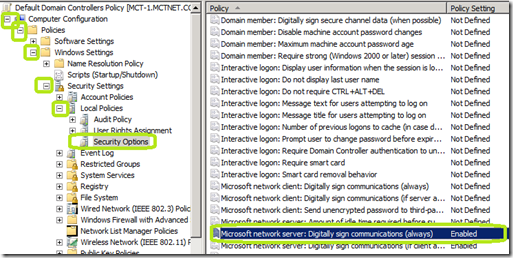
In the Group Policy Management Editor window, in the console tree, go to Computer Configuration/Policies/Windows Settings/Security Settings/Local Policies/Security Options.
In the details pane, double-click Microsoft network server: Digitally sign communications (always).
Verify that the Define this policy setting check box is selected, click Disabled to prevent SMB packet signing from being required, and then click OK.
Secure Channel is a way to transfer data that is resistant to interception and tampering.
To disable this functionality:
Open GPMC by clicking Start, click Run, type gpmc.msc, and then click OK.
In the console tree, right-click Default Domain Controllers Policy in Domains/Current Domain Name/Group Policy objects/Default Domain Controllers Policy, and then click Edit.
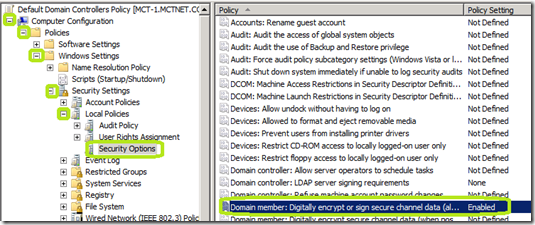
In the Group Policy Management Editor window, in the console tree, go to Computer Configuration/Policies/Windows Settings/Security Settings/Local Policies/Security Options.
In the details pane, double-click Domain member: Digitally encrypt or sign secure channel data (always), click Disabled to prevent secure channel signing from being required, and then click OK
It is not advisable to do either of these procedures unless you absolutely have to. This will lower your security posture and place you at higher risks of attack. I recommend that your NT4 systems be isolated in a small network of there own to help protect your other network assets.
Two things to take note of. If these Windows NT4 clients are going to be authenticating on a Windows Sever 2008 DC, then you may have a problem. For WinNT 4.0 SP2 and earlier, SMB signing was not supported. For WinNT4.0 SP3 and earlier, secure channel was not supported.
SMB signing helps to prevent Man-in-the-middle attacks.
To open GPMC, click Start, click Run, type gpmc.msc, and then click OK.
In the console tree, right-click Default Domain Controllers Policy in Domains\Current Domain Name\Group Policy objects\Default Domain Controllers Policy, and then click Edit.
In the Group Policy Management Editor window, in the console tree, go to Computer Configuration/Policies/Windows Settings/Security Settings/Local Policies/Security Options.
In the details pane, double-click Microsoft network server: Digitally sign communications (always).
Verify that the Define this policy setting check box is selected, click Disabled to prevent SMB packet signing from being required, and then click OK.

Secure Channel is a way to transfer data that is resistant to interception and tampering.
To disable this functionality:
Open GPMC by clicking Start, click Run, type gpmc.msc, and then click OK.
In the console tree, right-click Default Domain Controllers Policy in Domains/Current Domain Name/Group Policy objects/Default Domain Controllers Policy, and then click Edit.
In the Group Policy Management Editor window, in the console tree, go to Computer Configuration/Policies/Windows Settings/Security Settings/Local Policies/Security Options.
In the details pane, double-click Domain member: Digitally encrypt or sign secure channel data (always), click Disabled to prevent secure channel signing from being required, and then click OK

It is not advisable to do either of these procedures unless you absolutely have to. This will lower your security posture and place you at higher risks of attack. I recommend that your NT4 systems be isolated in a small network of there own to help protect your other network assets.
Comments
Thanks!